bot.radar

Know where AI
puts your brand.

Your buyers are asking AI. See when it recommends you, who it cites, and which competitors get there first.

30 days free. No credit card. No automatic billing.

VisibilityCitation rateShare of voice

Inside Radar

Your visibility, in context.

From the overview to your audience

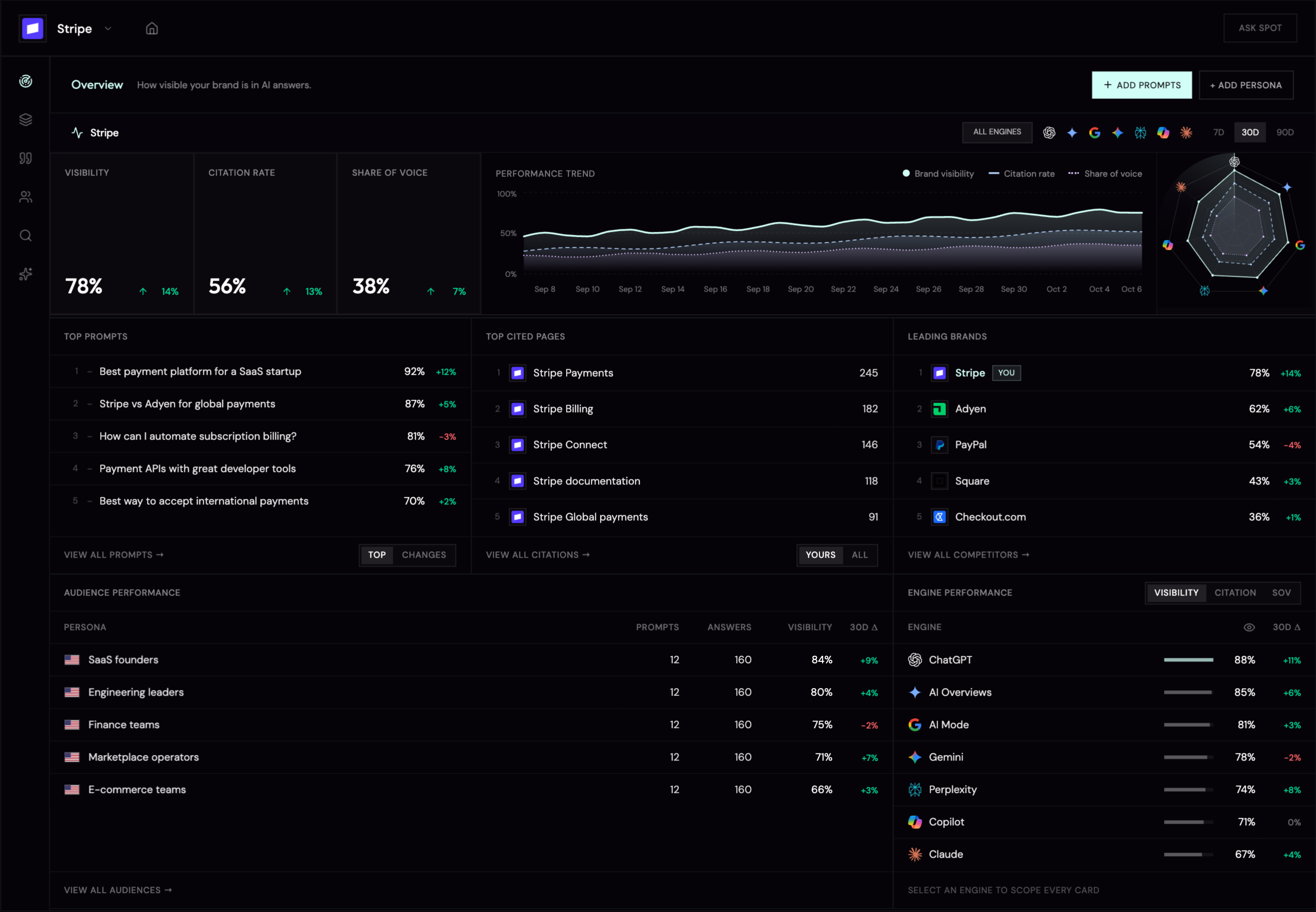
Radar overview with illustrative Stripe data: visibility, citations, tracked questions, competing brands, and audience performance.
01See your visibility02Follow the evidence03Understand your audience

Illustrative data · Stripe example

One brand. The whole picture.

Your audiences, your category, and the answers shaping your reputation.

For brands

Every client. One place.

Separate workspaces and reporting for the brands your agency looks after.

For agencies

01 / Performance

Track your presence.
See what changed.

A daily view of your visibility, citations, and share of voice. Read the trend across engines, then follow it back to the answers.

Visibility

78%14%

Citation rate

56%13%

Share of voice

38%7%

Performance trend

Brand visibilityCitation rateShare of voice
Sep 8Sep 15Sep 22Sep 29Oct 6
Radar performance · Illustrative Stripe data

How often does your brand appear? Track the share of answers that mention you, and see whether it is growing over time.

02 / Questions & sources

What gets asked.
What gets cited.

See the prompts that surface your brand and the pages AI turns to for evidence. Keep the question and its sources in the same view.

Top prompts

1Best payment platform for a SaaS startup
92%
2Stripe vs Adyen for global payments
87%
3How can I automate subscription billing?
81%
4Payment APIs with great developer tools
76%
5Best way to accept international payments
70%
View all prompts
Illustrative Stripe workspace

What are your buyers asking?

Track discovery, comparison, and problem-solving questions. See which ones put you in the conversation.

Top cited pages

1Stripe Payments
2Stripe Billing
3Stripe Connect
4Stripe documentation
5Stripe Global payments
View all citations
Illustrative Stripe workspace

Which pages earn the citation?

Identify the pages behind your AI presence, from product pages to documentation and third-party sources.

The competitive picture

See who else
makes the shortlist.

Radar finds the brands appearing alongside you. Compare their visibility and momentum using the same tracked questions.

Leading brands

1StripeYou
78%
2Adyen
62%
3PayPal
54%
4Square
43%
5Checkout.com
36%
View all competitors
Illustrative Stripe workspace

03 / Your audience

Find the audiences
you're missing.

A strong average can hide a weak audience. Compare the buyers you care about and see whose questions lead to your brand.

Audience performance

PersonaPromptsAnswersVisibility30D Δ
SaaS founders
1216084%
Engineering leaders
1216080%
Finance teams
1216075%
Marketplace operators
1216071%
E-commerce teams
1216066%
View all audiences
Audience performance in Radar · Illustrative Stripe data

Different buyers. Different answers.

Group questions by audience, market, and language to see where your brand connects.

Know where to look next.

Compare visibility and its change over time, then investigate the prompts behind an audience.

04 / Engine coverage

One brand.
Seven points of view.

The same question can produce very different answers. Compare your visibility across engines and choose the ones that matter for each prompt.

All seven engines are available. Your plan determines how many you run per prompt.

Engine performance

EngineVisibility30D Δ
ChatGPT
88%
AI Overviews
85%
AI Mode
81%
Gemini
78%
Perplexity
74%
Copilot
71%
Claude
67%
Select an engine to scope every card
Illustrative Stripe workspace
ChatGPT
Google AI Overview
Google AI Mode
Gemini
Perplexity
Claude
Copilot

05 / Getting started

Set the questions.
Keep the answers coming.

Start with what you know about your brand. Radar helps turn it into a repeatable daily check.

  1. 01

    Start with your brand

    Add your domains, products, and aliases. Radar uses that context to recognize you in each answer.

    Brand context →
  2. 02

    Define your buyers

    Describe who you sell to. Radar builds audience profiles around their roles, markets, and priorities.

    Audience profiles →
  3. 03

    Choose the questions

    Review the prompts Radar drafts for each audience. Edit them or add questions of your own.

    Prompts you approve →
  4. 04

    Let Radar keep watch

    Select your engines and markets. Radar checks daily and keeps the answers so you can follow the change.

    Daily results

From insight to action

Find the gap.
Give AI a better source.

Use what Radar reveals to guide your next content update. bot.optimizer helps improve the schema, FAQs, and summaries on the pages AI reads.

Good questions

Before you
start tracking.

A little more about how Radar works, what it measures, and what your trial includes.

How is this different from SEO rank tracking?
SEO tools track links on a results page. Radar tracks the answer that replaced it — who AI names, cites and recommends when there are no blue links at all.
Which AI engines do you cover?
Radar supports ChatGPT, Google AI Overview, Google AI Mode, Gemini, Perplexity, Claude and Copilot. All seven are available now and included on every plan.
Where do the questions come from?
You write them, or Radar generates them from your brand context and audiences. You always review before anything is tracked.
How do you know a mention is really my brand?
Brand Context stores your aliases, domains and “not to be confused with” entities, so answers are read in context — not keyword-matched.
Do I have to tag my products or pages?
No. They're detected passively from answers and citations.
Does Radar tell me how to improve?
Radar shows you exactly what's happening and the evidence behind it. Acting on it is bot.optimizer's job — Radar's findings feed it directly.
What's in the free trial?
The shared 30-day trial includes up to 150 prompts across 5 workspaces, with up to 3 engines per prompt. No credit card is required, and the trial does not convert automatically.
How often do questions run?
Daily by default, configurable per question.
Can I export or report on this?
Every run and every metric is visible in the workspace. Scheduled exports and reporting are on the near-term roadmap.

Your brand is next

Find your place
in the answer.

Start with the questions your buyers ask. See what AI says about you today, and follow what changes tomorrow.

30days free
150prompt limit
5workspace limit

Up to 3 engines per prompt. No credit card.
Your trial does not convert to a paid plan automatically.